> ## Documentation Index
> Fetch the complete documentation index at: https://restaurants.poly.ai/llms.txt
> Use this file to discover all available pages before exploring further.
# Updating pronunciation
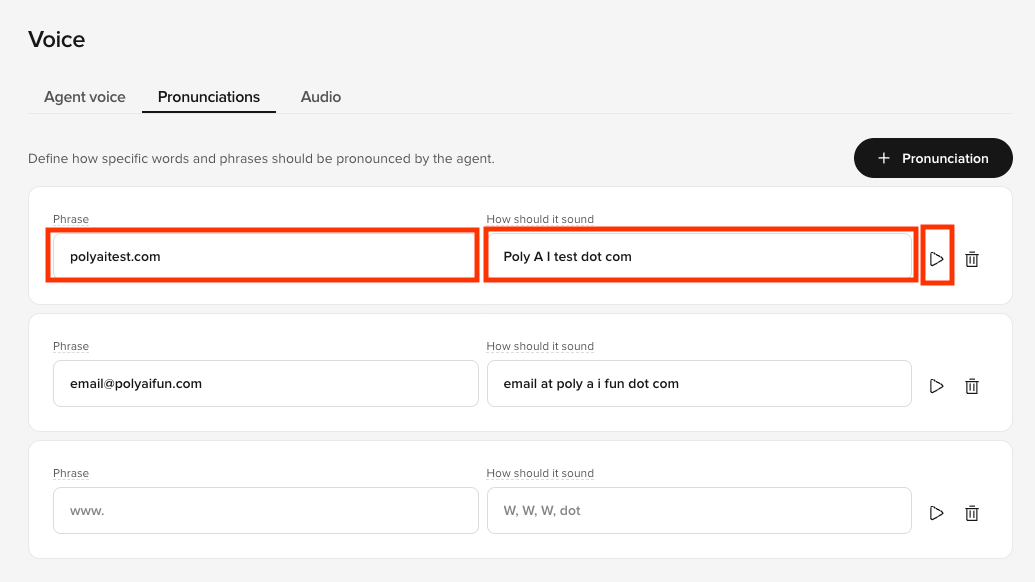
If there are words that your PolyAI agent struggles with pronouncing correctly, you can specify how the agent should pronounce those words in the PolyAI platform.
Here is how to do so:
1. On the PolyAI platform, click **Voice** on the left panel
2. Click the **Pronunciation** tab at the top
3. Click. **"+ Pronunciation"**
4. Enter the **Phrase** (which is the word ir phrase the agent is pronouncing wrong) and **How it should sound** (which is the phonetic spelling the of word or phrase)
5. Click the **Play button** to the right to hear how the agent pronounces it now
6. If you are satisfied, click **Save to version** in the top-right
7. Add a note about what you changed
8. Then click **Save to version** again
9. Click **Versions** on the left panel
10. Click **Go Live** to the right of the change you made
 * Email address
* Restaurant name
* Website
Note: If the agent is already saying the term or phrase correctly, there is no need to add it to the Pronunciation tab.
* Email address
* Restaurant name
* Website
Note: If the agent is already saying the term or phrase correctly, there is no need to add it to the Pronunciation tab.